
What players say
Keyspace offers a unique and creative puzzle experience that stands out in the platform genre. The core mechanic of using keyboard keys as both controls and platforms is ingenious and keeps each level fresh. The pixel art is charming, and the lack of downloads makes it instantly accessible. While the difficulty ramps up nicely, the game remains family-friendly and non-violent. It is an excellent choice for puzzle fans looking for something different.
About this game
Game Introduction
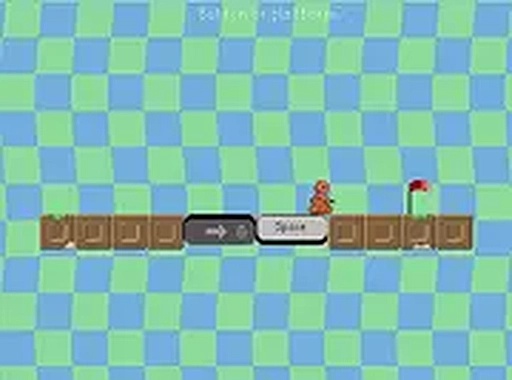
Keyspace is a creative platform puzzle game that offers a fresh take on keyboard interaction. Players control a small robot on a mission to reach a red flag at the end of each level. The unique twist is that the arrow keys and space bar used to move the robot also become the platforms the robot jumps on. This means every key press serves a dual purpose: it moves the robot and creates a surface to land on. The game challenges timing and sequence skills, as players must press the right keys at the right moments to avoid falling. With its charming pixel art style and simple controls, Keyspace provides an engaging experience for players of all ages. It can be played directly in a browser without any downloads, making it easy to start a quick session anytime.
How to Play
To play Keyspace, use the keyboard to control the robot. The arrow keys and space bar are the primary tools. Press the correct keys in the right order and with proper timing to guide the robot across each level. The goal is to reach the red flag at the end of each stage. Plan moves carefully, as each action affects the robot's position and the available platforms. The game is easy to learn but offers increasing challenges as players progress through levels. It can be played on both desktop and mobile devices, and full screen mode is available for a more immersive experience.
Game Features
Keyspace features creative platform gameplay where keyboard keys become platforms. It has a pixel art style with simple, clean visuals. The game is free to play with no downloads required. It works on mobile and desktop devices. Full screen mode is available for better immersion.
Tips for Success
Focus on timing key presses carefully, as each press both moves the robot and creates a platform. Plan the route before starting to move to avoid falling into gaps. Practice each level to learn the sequence of keys needed. Stay patient and try different key combinations if stuck. Regular play will improve hand-eye coordination and puzzle-solving skills.







Player comments
Sign in to comment
You must be logged in before posting a review or rating.
No account? Create one
No comments yet. Be the first to comment!